Borough Builder

Your church's work, finally connected.

One permission-aware assistant for people, giving, events, communications, civic life, and the documents behind every decision.

Managed pilot · Web, iPhone, and iPad experiences · Public store release pending

Borough Builder church staff assistant on a desktop computer
Borough Builder member experience on an iPad
Borough Builder assistant on a phone

Real product captures with demonstration church data.

Three client layers

Built for the people doing the work.

Pilot access

For churches

Bring staff operations and the member experience onto one shared record, with role-based access throughout.

  • People, households, membership, classes, and care follow-up
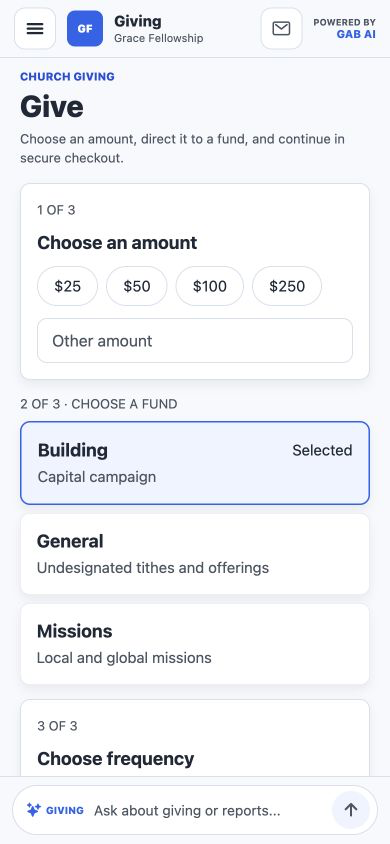
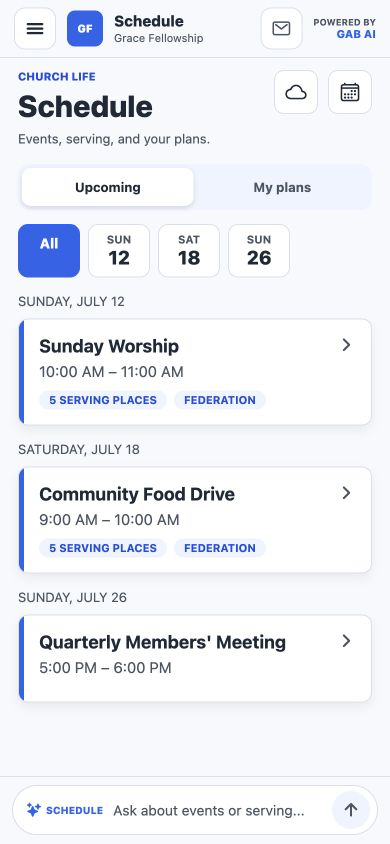
  • Giving, events, volunteers, groups, and communications
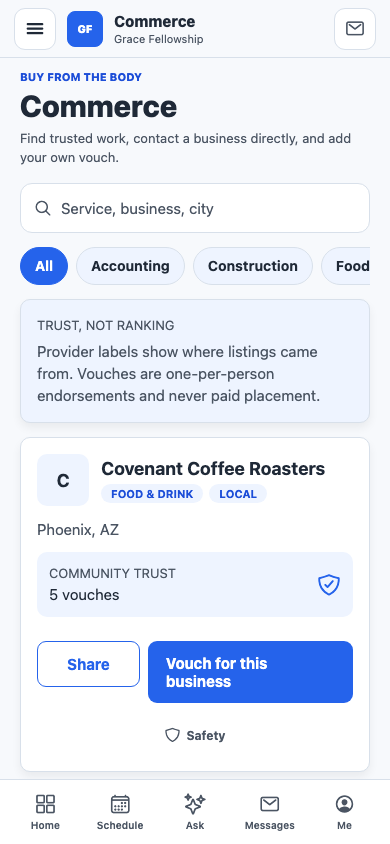
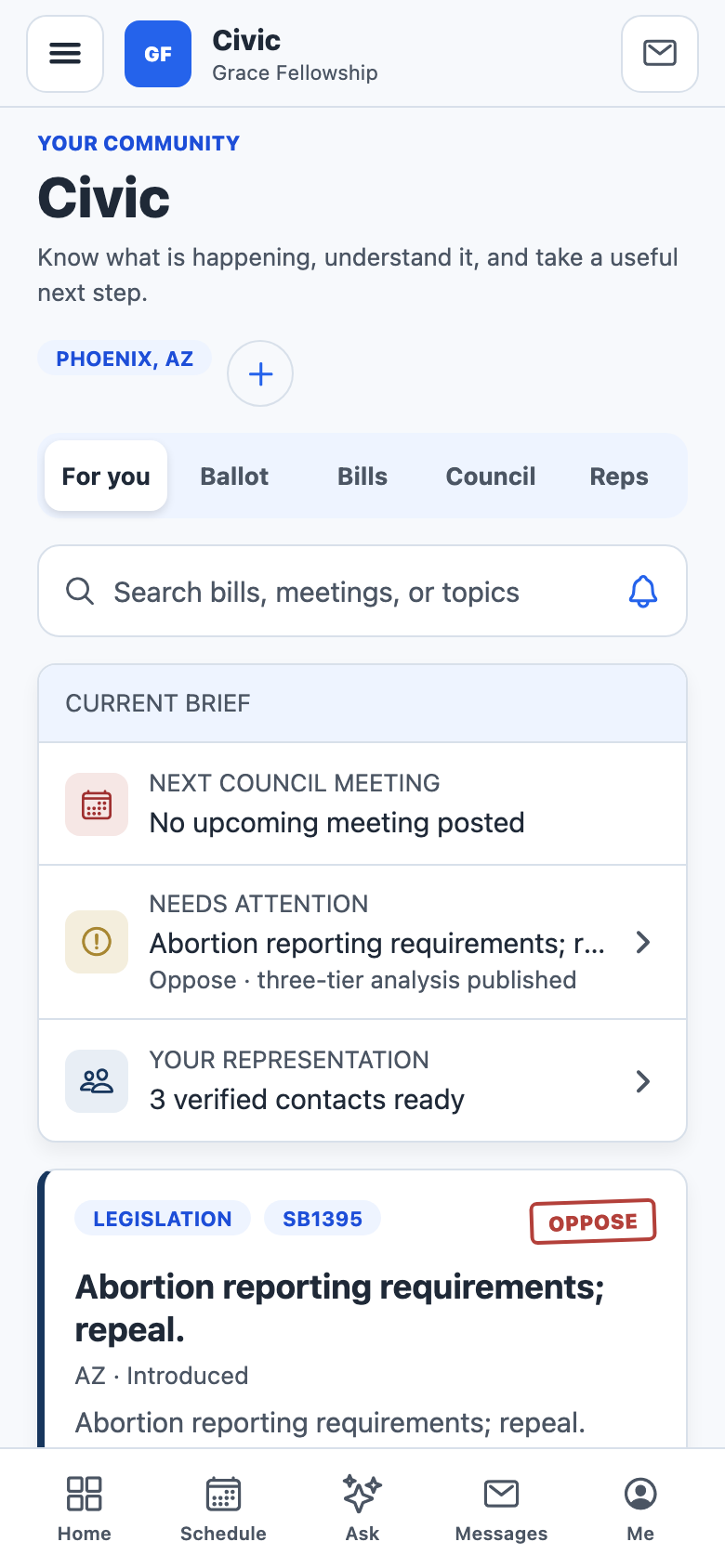
  • Civic analysis, Commerce, Vault documents, and church networking
Join the church waitlist
Pre-launch

For Individuals

Use Civic, trusted business referrals, private connections, and Circles before your church is on Borough Builder.

  • Civic and ballot context for one state
  • Commerce vouches and invite-only connections
  • A church-discovery and account-transfer path when the time comes
Join the Individual waitlist
Managed pilot

For nonprofits

Coordinate with eligible churches across licensed states without taking over a congregation's voice.

  • Statewide event publishing for eligible churches
  • Staff-only messages with inspected PDF attachments
  • Sponsored petitions with transparent attribution
Join the nonprofit waitlist

The pathway

From one believer to a church plant.

An Individual account is not a dead end — it is the on-ramp. The same record you start alone becomes the seed of a congregation.

  1. Start as an Individual

    Civic context, trusted Commerce referrals, and private connections for one believer — no church required yet.

  2. Gather a Circle

    Invite believers near you into a private Circle while the gathering is still a living room and a shared meal.

  3. Plant the church

    Move into the church-plant workspace with the full staff console and member experience from day one.

  4. Grow the congregation

    People, records, and giving history carry over. Your Individual subscription ends when you join a church account.

Circle coordination and assisted account transfer are part of the current Individual pilot; public enrollment remains waitlisted.

Inside the product

The same work, carried from the office into the week.

Real screens from the current product, shown with demonstration church data.

Available records and actions vary by role, organization, and connected providers.

A connected operating system

Useful on Monday because it remembers Sunday.

Borough Builder connects operational records instead of turning every ministry into a separate app and a separate export.

01

Know who needs attention

People, households, membership stages, classes, groups, interactions, and follow-up tasks share one history.

02

Coordinate the work

Events, volunteer slots, communications, goals, and staff dashboards stay tied to the people doing the work.

03

Handle money plainly

Giving uses the church's connected Stripe account. Borough Builder charges no platform percentage; normal processor fees still apply.

04

Act with context

Civic analysis, cited Vault answers, Commerce referrals, and church-to-church workflows preserve source and access context.

Enterprise trust

Permission first. Assistance second.

The product is designed around church authority, scoped access, and human decisions rather than autonomous action.

Organization-scoped access

Server-side authorization and database row policies keep ordinary church records inside the signed-in organization.

Role-aware answers

Assistant retrieval applies the user's permissions before records are queried or included in an answer.

Humans authorize action

Assistance can search, summarize, report, and draft. Staff review external communications and users confirm financial actions.

Sensitive records stay separate

Care and discipline documents use narrower access rules, are excluded from AI surfaces, and retain access history.

Security is an ongoing operating practice, not a badge. Pilot customers should review their role setup, connected providers, and data-handling requirements during onboarding.

For verified nonprofits

Reach a state without taking over a church's voice.

Statewide coordination is built as a church-controlled layer. Verified nonprofits can publish events, prepare staff messages, and sponsor petitions while each church decides what its people see and share.

Join the nonprofit waitlist

Statewide calendars

Publish timely events to eligible churches in licensed states, with source organization and date details intact.

Staff messaging

Send accountable staff-only messages with inspected PDF attachments. Churches retain inbox controls and mute settings.

Petition campaigns

Fund and publish petitions with transparent sponsorship, verified state eligibility, and auditable support.

Early access

Tell us where you want to begin.

Every path starts with a short questionnaire stored securely for Matt's review. No published price, checkout, or automated sales funnel.

Churches

For established congregations, church plants, and church networks evaluating the staff console and member app.

Join the church waitlist

Nonprofits

For verified organizations coordinating statewide events, staff messages, and petition campaigns with churches.

Join the nonprofit waitlist

Each path opens a five-question form. The confirmation screen appears only after your request is safely stored.

Questions

The practical details.

What can a church use today?

The staff console, API, and a pilot member app build are being used and refined through managed pilots. Public app-store distribution and open Individual enrollment are not available yet.

Does Borough Builder take part of each gift?

No. The platform percentage is 0%. Giving is routed through the church's connected Stripe account, and Stripe's normal processing charges still apply.

How do I join the waitlist?

Choose the church, Individual, or nonprofit path above. Complete the short questionnaire; the site confirms that your request was saved and its notification accepted for delivery.

Does the assistant act without approval?

It can search permitted records, summarize, report, and prepare drafts. Permissions are applied before retrieval, and people remain responsible for external communications and financial actions.

Are all integrations live?

No. Some provider workflows require operator credentials and church configuration. Pilot onboarding confirms the exact providers available before making a migration promise.

Can a nonprofit message church members directly?

No. Nonprofit messages are delivered to eligible church staff. Each church controls its statewide feed, mute settings, and what it chooses to share with members.

Can someone outside the church see member records?

Public and signed-in surfaces are separate. Internal records require authentication and appropriate organization access; staff permissions further narrow sensitive operations and records.

Managed pilot onboarding

See the product against the work your church already does.

Join the waitlist